Individual & Family Support
Support individuals, families and groups using workflows tailored to your services.
Seren | Your Casework Management Solution
Secure, smart and customisable software designed for Advocacy, Advice, Counselling, Community Support and Wellbeing Services.
Current live-site note
Home
Built for Charities, Advocacy Services, Wellbeing Teams, Advice Services, Student Unions and Community Support Organisations, Seren helps your team focus on delivering better outcomes rather than managing paperwork.
Support individuals, families and groups using workflows tailored to your services.
Manage referrals, assessments, case notes, actions and outcomes from a single system.
UK hosting, GDPR compliance and bank-grade security help protect sensitive client data.
Create meaningful reports and dashboards to demonstrate impact and service performance.
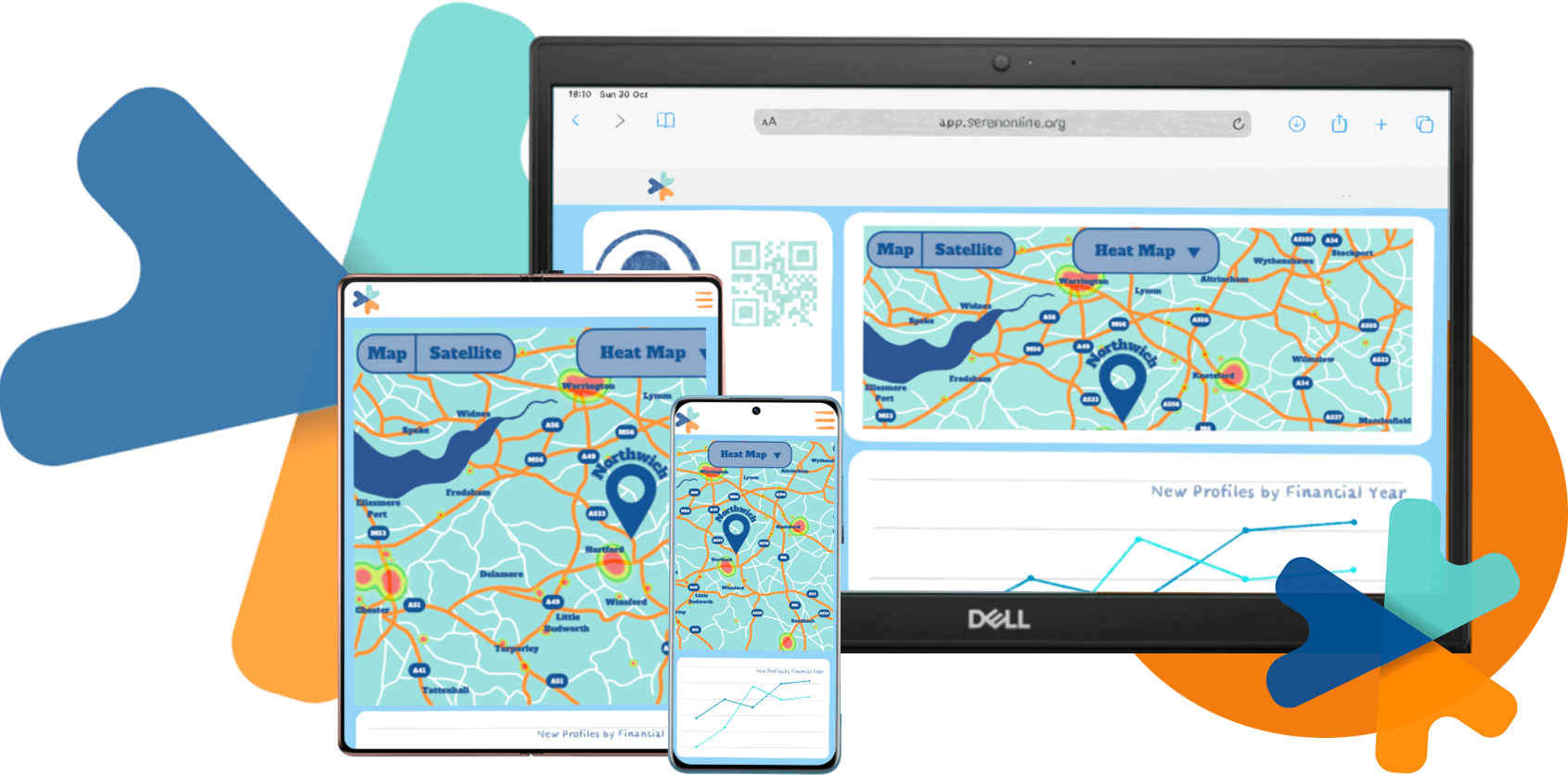
Access Seren securely from desktop, tablet and mobile devices.
Flexible configuration allows Seren to adapt to your processes and ways of working.
Home
From referrals and assessments to case notes, reporting and outcomes, Seren gives your team the tools they need to deliver better support.
Home
Organisations across advocacy, counselling, wellbeing, community support and advice services trust Seren to help manage cases, demonstrate impact and deliver better outcomes.
“Seren has completely transformed the way we manage referrals, case notes and outcomes. Our team spends less time on administration and more time supporting people.”
Claire, Advocacy Service Manager
“OMG I love it!”
Karen, Community Inclusion Service Manager
“With Seren we finally have a system that captures the data we need! Reporting is perfect for our internal and external needs. Being able to customise so much ourselves is brilliant.”
John, Mental Health Advocacy Manager
Features & Editions
Basic
For small teams of 2-15 focused on delivering support to individuals.
Seren Basic Edition gives you the full power of profile customisation and voice dictation, in addition to outgoing SMS and Export to Word.
Work with unlimited clients, create up to 10 new client profiles plus receive 20 SMS credits each month per user subscription. Need more? - Add Bolt-ons that never expire, at any time.
Available on monthly or annual subscription.
Standard
For larger teams of up to 25 managing a drop-in advice service or delivering one-to-one support involving goal setting through action plans.
Work with unlimited clients, create up to 30 new client profiles plus receive 20 SMS credits each month per user subscription. Need more? - Add Bolt-ons that never expire, at any time.
Seren Standard Edition does not include Groups or mobile access. If these features are important to you, consider Seren Premium Edition.
Available on monthly or annual subscription.
Solo
For professionals working independently and delivering one-to-one support.
Notes, goals, milestones and outcome stars are all standard features for Solo users, as well as 2-way SMS, Email2Seren, and voice dictation.
Seren Solo Edition brings functionality not seen before for individual practitioners to take your service to the next level.
Work with unlimited clients, create up to 25 new client profiles plus receive 20 SMS credits each month. Need more? - Add Bolt-ons that never expire, at any time.
Available on monthly or annual subscription.
Work with groups? Try Seren Solo Premium Edition.
Premium
For teams of any size or Individuals with Seren Premium Solo Edition
Seren Premium Edition unlocks even more features to provide a complete suite of tools to record, report and manage your service. Seren Premium Edition includes mobile access and the ability to record support in group settings and for families.
Work with and create unlimited client profiles and receive 20 SMS credits each month per user subscription. Top up with Bolt-ons that never expire, at any time
Available as a 1, 12, 24 or 36 month subscription.
Feature library
The People module is at the heart of Seren. This is where you record profiles about the people you support. You can customise the terminology to use ‘Service user’, ‘Client’, ‘Person’, ‘Partner’, or any other term you may use to describe the people that you support. Seren includes over 100 predefined data points. Ranging from Name, Address, Demographic, Risk, Consent, Next of kin, Special instructions and Service information, to help you capture the information that you need to record. Every list in Seren is fully customisable so that you can self-administer the content and tailor it to your exact needs.
Seren also includes options to add up to 30 more customisable fields. You can choose the name and contents of these fields which may be lists, text boxes, dates or multiple select lists. This gives you the ultimate power to tailor Seren around your exact recording requirements. For example: A service offering counselling may record the presenting issues of a client, while an Advocacy service supporting a particular client group can record demographic profile points specific to them. Services in the work and employment sector can record CV and skills related information and a Carers service can log information about the cared for person and their needs. Seren has the power, flexibility and capability to record even the most complex data capture needs, in a way that is highly personalised to the work that you do.
Sometimes, there are situations where you need to restrict access to particular profiles. Seren has pre-built functions for you to choose those users that can or cannot see a particular profile. This is particularly important when complying with the updated Data Protection Act and GDPR. If you have more complex access restriction needs, we can restrict access to particular functions for a specific user group. For example: Volunteers may have the ability to view case notes, but they cannot edit or delete them. Contact your Product Manager to discuss your specific requirements.
Seren gives you the option to create and assign profiles to an unlimited number of mailing lists. Use these mailing lists to target specific profiles and send them emails, SMS messages or letters; to keep them informed. Lengthy and time consuming (as well as expensive) mail merges are a thing of the past! By communicating with the people you support via SMS and e-mail you are assured of almost instant delivery in a professional and efficient way. Our Premium and Solo Editions include 2-way SMS messaging. This activates the ability for the people you support to reply to your messages and those interactions are automatically logged on their profile!
Powerful search capabilities make it easy for you to find profiles. Seren includes personalised lists and search options meaning you can find a the profile you need by almost any data point.
Having created a profile many new options will be available to you. The tabs along the top provide access to Notes, Tasks, Goals, Milestones, Messages, Attachments, Letters, SWEMWBS and Stars. The majority of your casework will be recorded in the Notes tab. Here you can record interactions with your client or work carried out on their behalf, creating a powerful audit trail and narrative. To start, simply select ‘Add Note’. There are many options available here, and with Seren’s advanced customisation options, you can create your own custom fields, we can also create these for you with our Consulting Time Bolt-on.
The data you capture can be used in your reporting, through either our default reports or custom options created specifically for you. Running through the options, you can record the Date and time of your interaction, any actions taken, location of a meeting, who carried this work out, the results of said interaction and importantly, the precise time spent on this piece of work. This data combined with Seren’s easy access to view features, such as the side panels and reporting functions, will be an invaluable tool when reporting back to your funders, customers or anyone else you may need to provide data to. We can also help you with anonymising your data should you need.
A powerful timesaving tool for writing up your notes with your voice, Simply click ‘Start recognition’ and speak. You can have up to 3 sections here, select the section you wish to enter into by clicking the toggle to the left. The timer above shows your remaining credits, you can purchase additional time in the shop, the credits never expire so that’s one less this to worry about.
Further down, we have Outcomes and Signposting, click the cog (Administrators only) to add your own options on the fly. These are multi-select fields so you can select as little or as many as you require. Many of our customers find these fields to be among the most important for their reporting needs as it is a highly requested piece of information by many Local Authorities and charitable funders such as the Big Lottery Fund and Comic Relief. Additional Information The next section is where your custom fields will appear. You can create up to 10 of each type of field giving you the flexibility to store every eventuality for any service type and importantly report upon them.
Lastly at the bottom of the page we have the follow-up section. Add a date and note here, they will pop up in your Dashboard so you can let Seren remember for you and even add SMS reminders for that extra prompt. Lastly once you save your note you can see your entry in the notes panel, click on the ID to read in more detail or click the Word button to download this note as a word document so you can send it to another member of your team, your client or anyone else who requires it.
Managing multiple services has never been easier with Seren’s shining star feature for organisations providing multiple services. Create your own data fields, neatly itemised into cards and incorporate them into your client files. View all current and past services for a client within their profile and manage each service they receive independently or as one, the choice is yours. We even have ready to go templates available for popular services such as IMHA, IMCA and Counselling plus many more.
For many organisations, recording client notes can get messy, especially if providing more than one service. With Case Templates, you can separate each service whilst remaining within the same client profile. Each case will then capture the data points that you define, meaning your reporting will be more accurate and you can view only the fields required for that case, meaning less clutter. Case templates also work with families, so for example, you can record Family Counselling alongside Advocacy, and also provide support to one or more individual family member.
Case templates are completely custom to you or your organisation. Using the Case template configurator, you can choose what data you capture and where it is displayed or recorded. Choose up to 10 fields of each type. Field types available include: Text boxes, drop-lists, multi-select lists, toggle switches, staff lists and more.
Not sure where to start? Our pre-made templates are available and can be used as is, or we can support you to customise their content further. Example services include IMHA, IMCA, RPR, Counselling, Benefits Advice and more.
Not all of your work is with just one person at a time. The Group work module can handle this for you with the simplicity and speed you’ve come to love from Seren. When you set up a new group you can choose the facilitator, the session dates and times, as well as the number of sessions. Log the joining instructions for online meetings such as Teams or Zoom, the presentation method and also set the venue for physical group meetings and add the attendees from a list of your client profiles. As with enquiries and notes you can define the topics of the group work, as well as setting a title and description. When a group ends you can formally close it and record the outcome as well as add attachments at any time.
Just like individual profiles each group is assigned its own email address that you can use to send important emails and documents to straight from your inbox. You can also generate word documents about the group as well as for individual sessions. Gather the data you need When you record information about a session you can record attendance numbers, cancellations and ‘did not attends’ as well as summary notes about the session which can be automatically associated to each individual that attended. After each session you can automatically request feedback from attendees via SMS. People will receive a short message with a link to a feedback form that they can complete anonymously if they choose. You will receive an e-mail about each completed feedback form. Groups also includes the same sticker and tag functionality as notes and enquiries, so you can mark important groups for a visual indicator, reporting and analysis. Future versions of Seren will include automatic invites and confirmation requests via SMS so you can predict attendance before a session takes place.
After a session note has been created you can add this to all attendee's profiles and edit those individually. So, if you want to add specific information to an individuals profile, simply click edit and add or remove your required text.
Managing groups with Seren is simple and straight forward. Giving you control and instant visibility over attendance session notes and feedback to help improve future sessions.
Much like Groups, the Families module allows you to add family members, add tags and stickers but also allows you to add notes, tasks, goals and milestones for the family as a whole. Easily switch between the family and the individual profiles from the Family Members tab and even add multiple services with the Case Templates feature. As with Individual and group profiles, each family is allocated its own email address allowing you to attach emails and documents to the family profile from your inbox.
Speed through your notes by creating a personal library of stock phrases and templates. Common tasks and requests will take less time than ever! You’ll find your Snippets library in the main menu, here you can create, edit and remove snippets. The interface is as simple as can be, with just two fields to complete. Your main content e.g. “First meeting with client, introduced myself and explained my role, completed the initial assessment template.” and a title such as “First meeting”. Then when adding new notes, simply select the Snippet from the ‘Insert a snippet’ menu, and the content will be placed into your note. You are then free to add or remove any additional text or even use the ‘Speech to Note’ service to speed things up even more. Snippet’s can save time and couldn’t be easier to use.
Seren’s Enquiries module is the perfect partner if you run an advice-line, drop-in or signposting service. Record all your enquiries in one place and capture the subject areas your local community are most concerned about. If you run a helpline, drop-in, or one-stop advice service where you typically only have a single interaction with someone, you can use Enquiries to record this work. You can also log incoming requests about the services you offer and even use it as a waiting list.
When you log an enquiry you can capture information about the type of caller, their name and contact information. You can also record their address where appropriate. Seren includes a powerful topics chooser that is entirely customisable so you can record the nature of the enquiry and it’s outcome. As with Profiles, Families and Groups you can attach documents, record a follow-up date with automatic reminders and add tags and stickers to identify particularly important interactions or highlight the type of enquiry made.
Throughout Seren, you can customise your search results to see what is important to you. Reporting is made easy, produce insightful reports in Excel, or download individual inquiries as a Word document to provide a transferable record.
Set, manage and work towards goals with your clients, be that something formal like processing a benefits application, something simple like enabling access to a hobby or working towards a big life change. Use goals as a personalised action or support plan for your clients. It's easy to export to Word so you can give your client a copy too!
Record breakthroughs with Milestones. Report back to your funders and let them know how big of an impact you and your organisation have to your clients. Have the data on hand to show your clients what you have accomplished together, providing that all important encouragement and support to go further than ever.
Another great time saving feature! Copy Seren into emails to your clients or other professionals and we will automatically attach it to the profile. If you work in areas where internet or phone signal is poor, send Seren an email and when your device connects and sends the email, it’ll go straight into your file, meaning you don’t have to revisit the note when you move on to another task.
Always online, for those late nights or weekend tasks Seren is not just for 9-5 work. Built using the latest HTML5 user interface framework for building interactive and high-performance applications, Seren will work perfectly with any modern browser. Perfectly optimised for Mobile Devices, quickly obtain a phone number on your mobile, send a feedback request while you're on a client visit and much more. It's all on hand any time anywhere!
Seren comes with 5 themes to choose from, so you can choose the look you love!
Brighten up your day with Light mode or rest your eyes with Dark mode . Go bold with Material or clear out colour with Uniform and of course there's High Contrast for those who need that little bit of extra clarity.
Add an additional level of security by signing in to Seren with your Microsoft 365 or Google account. Plus, that’s one less password for you to remember!
How many times have you been given the wrong postcode or street name? Search by first line of address, postcode or building name and get an accurate postal address, view it’s location on Google Maps and even display the relevant local authority and health board.
Send and receive text messages to one or more of your clients or team without pulling your phone from your pocket or sharing your number. Your message history will automatically save to your client's profile.
Add pictures, documents, emails and even videos to your casefiles so they’re right where they need to be. General data can be attached to a clients profile, emails to a specific note or enquiry, you choose what and where.
Accepted attachment types in Standard Edition:
.txt, .pdf, .jpeg, .jpg, .png, .gif, .docx, .doc, .rtf, .eml, .msg, .zip, .7z, .xls, .xlsx, .ppt, .pptx, .pps, .ppsx, .pub, .one
Download your notes in the most commonly used format, Microsoft Word (.docx). Send your clients, manager, funding authorities or anyone else who needs them a copy of your notes for supervision sessions, benefit applications, GDPR requests and more in one easy click.
Seren’s Export to word feature is available throughout the client journey. Export an individual note, a full client profile or a specific service.
We can even set up custom anonymisation should you need to hide certain details from your exports.
Record important things to do and set reminders. Upcoming tasks appear on your Dashboard to help you keep track of your workload. Add tasks to profiles and services so you can see at a glance what’s next on the agenda for that client or family. You can even assign tasks to other members of your team! Going on annual leave? Ask a team member to cover an important meeting. For managers, you can assign tasks to your team members and keep track of their progress. Assign priority, deadlines and classify tasks by type. As with everything in Seren, you can fully customise the lists to ensure you record your tasks accurately and even report upon them for your statistics.
You can assign stickers and tags to any case, note or task in Seren. Whether it’s a reminder flag, a high-risk case, or a subject-area that is important to track, Stickers make it easy for you to find important information on a particular topic.
Identify new and upcoming trends about the issues that are important to your local community with this extremely powerful feature. Create the sticker ‘cost of living crisis’ and produce statistics around this topic, or retrospectively tag inquiries that are relevant to a current issue. Trending topics that are relevant to your funding can be highlighted and flagged for case studies reports or funding bids.
Many of us use #tags on social media. They allow us to easily identify content that we want to see. So why not use them at work? Choose your own tags to visualise your caseload in a way that helps you. Tag your notes with #completed or your cases with #onhold. You can choose literally anything and use it in anyway you wish. Run reports for your caseload and use tags in searches to easily see your progress or identify high priority or long-standing clients.
Start off right with upcoming events, maps, statistics and more with your interactive Dashboard. How many referrals have you had this month? No need to calculate or run reports, it’s all there. You can even add your own customised statistics and charts. Having a tough day? Go fishing, read a joke or grab an inspirational quote to help keep you going.
Seren's built in heat map highlights the areas where your service is most and least prominent, allowing you to focus on expanding into the areas that could need you the most.
Using maps to allocate your client's to staff members already working in that area can save valuable time travelling that could be spent better supporting people in need.
View your upcoming events, beautifully classified by date and highlight something you may have missed without going through casefile after casefile looking for that meeting you just can't remember fully.
With dynamic charts, Seren's dashboard displays new referrals, client contacts, Notes recorded, Live workload, recent closures and more, so you can get those important figures in a flash. We can even add custom charts should you wish to view something specific to your service.
Don't get caught out by not taking down details quickly enough. Access or create a client profile or enquiry in the Quick Access Bar in seconds.
From fishing to jokes and inspirational quotes, take a moment to clear your head and even have a little giggle to brighten up your day. Administrators can limit the number of daily interactions so theres no worry around time wasting. Want something really different? Get in touch and we can add almost anything here, from Bible verses to movie recommendations and everything inbetween.
Additional configuration required
The Online Referrals function consists of two modules that make it easy and convenient for you to receive and manage referrals from various sources.
This is an online portal that allows people to refer themselves or others to your services. It has two secure and user-friendly forms: one for self-referrals and one for third-party referrals from professionals, family or friends. You can link to the portal from your website, email signature or even a QR code for your marketing!
This is a dedicated module that helps you process and manage your incoming referrals. You can accept or decline referrals and create client profiles with just one click. You can also add Business Rules to your Referral Module and notify relevant staff of the new case to be allocated or worked with.
**This function requires custom setup. See Bolt-ons for pricing
Seren can send requests for feedback about your service, and you receive an email for every completed form. Your clients can choose to remain anonymous if they desire.
This all important feedback could be vital to renewing your finding and ensuring that you provide the best service possible. With Seren this process is made so easy you'll wish you'd made the switch sooner.
Simply select 'Request feedback' when adding a note or group session to send a feedback request to your client or group attendees.
**This function requires custom setup. See Bolt-ons for pricing
Seren is hosted in a leading UK datacentre on our own secure servers. With dedicated firewalls, automated backups and an always up to date Microsoft Windows operating system you can rest assured your data is safe from prying eyes and downtime. With 99.99% uptime, we are yet to encounter a system outage and we aim to keep it that way.
Blue Door Software are Cyber Essentials PLUS Accredited. For confirmation: Click Here
GDPR Compliant data storage. We use encryption and fully up to date database technology to ensure your data is safe.
It happens to us all, you delete a file or attachment and then a week later you need a reference number, or that long gone client comes back and doesn’t have copies of much needed paperwork. With Seren you can recover your deleted data for up to 180 days.
Recovery period with Basic Edition: 30 days
You’re never alone with Seren, from our informative video guides to personal support from your product manager, you’ll be up and running in no time at all.
Get personalised one to one online support so you get the answers you need to get the best from Seren. These allowances renew after every full years subscription.
Included support with Basic Edition: 1 hour
Included support with Standard Edition: 2 hours
Included support with Premium Edition: 5 hours
Bolt-ons
Extend your Seren edition with optional modules and additional services. Bolt-ons can be added when needed, helping your organisation introduce new capabilities without changing its core subscription.
Explore the bolt-ons available for your Seren edition
Take the stress out of configuration with Seren’s Supported Setup Service. Whether you're starting fresh or transitioning from an existing system, our experts are here to help.
We’ll configure Seren for you by reviewing your current setup or working from paperwork examples, ensuring everything is tailored to your needs. It’s a hassle-free way to get up and running quickly, with confidence that your system is set up correctly from the start.
The Online Referrals bolt-on consists of two modules that make it easy and convenient to receive and manage referrals from a range of sources.
This secure, user-friendly online portal allows people to refer themselves or someone else to your services. It includes separate forms for self-referrals and third-party referrals from professionals, family members or friends.
Link to the portal from your website, email signature or a QR code used in your marketing materials.
A dedicated module helps your team process and manage incoming referrals. Accept or decline referrals and create client profiles with a single click.
Business Rules can notify relevant staff when a new referral is ready to be allocated or worked with.
Create a bespoke feedback form that makes it easy to collect feedback from clients at any stage of your service.
Request feedback after closing a case, completing a group session or at any other point in the client journey. Requests can be sent directly through Seren.
You can also link to the form using a QR code in presentations, emails or printed materials. Clients can complete the form securely from a smartphone and may respond anonymously where appropriate.
Keep sensitive information secure using Teams and Case Teams restriction templates. These controls help ensure staff can access only the cases relevant to their team, project or responsibilities.
Restrict users to cases assigned to themselves or to another member of their team. Staff can work within their allocated service area without accessing unrelated cases.
Restrict users to specific case types. Other case types remain unavailable for viewing or editing by unauthorised team members.
Combine team-based restrictions with Custom Roles to define access permissions that closely match the structure and responsibilities of your organisation.
Keep sensitive information secure by allowing staff to access only the profiles relevant to their location, project or supervisory responsibilities.
Users can view and edit only the client profiles and cases assigned to their location or project. Information relating to other clients remains hidden from unauthorised users.
Where appropriate, supervisors can be given access to the profiles and cases required for their oversight responsibilities while other records remain restricted.
Combine location-based restrictions with Custom Roles to create access permissions that closely reflect the structure, responsibilities and working practices of your organisation.
Activate notifications for additional Seren functions and help your team stay up to date with important activity.
Receive notifications relating to tasks so staff can remain aware of actions that require their attention.
Extend notification support to custom actions and other relevant workflows within Seren.
Choose email or SMS notifications to keep relevant users informed using the communication method most appropriate for your service.
Bespoke Business Rules allow you to tailor Seren to your organisation’s processes, reduce repetitive administration and help staff stay on top of important activity.
Create automated reminders for important tasks, actions and deadlines so that staff know when activity requires their attention.
Automatically send reports to managers or stakeholders at your chosen date and time, helping key information reach the right people without the need for manual distribution.
Notify relevant staff when important case activity occurs, including changes to allocations, prolonged inactivity or the identification of high-risk information.
Use a professional, mobile-friendly email template featuring your organisation’s branding and domain or email address.
Business Rules help streamline workflows, improve consistency and keep your team informed throughout the client journey.
Create roles that reflect the job titles, responsibilities and working practices within your organisation, including specialist roles such as IMHA, RPR or student placements.
Define which areas of Seren each role can access and control which information users are permitted to create or edit.
Filter the information available to each user according to the role and responsibilities assigned to that person.
Hide unnecessary or sensitive information to create a clearer interface and a more focused workflow for each role.
Use clearly defined roles and permissions to support consistent working practices, protect sensitive information and improve service delivery.
Commission a bespoke function, module or tab designed around the specific requirements of your organisation and the way your team delivers services.
Introduce capabilities created specifically for your workflows, service model or reporting requirements.
Bespoke development can extend the existing Seren experience with additional functions that work alongside your current configuration.
Contact your Product Manager to discuss your requirements and explore the options available for bespoke development.
Bolt-ons
Purchase additional features, credits or custom functions without changing your subscription. You may experience a seasonal peak in demand or need more SMS credits to send your quarterly newsletter. Bolt-ons are a low-cost flexible solution to meet the temporary peak demands of your service. Bolt-ons can be purchased at any time for additional profiles, address searches, sms credits or feature unlock from another Edition. You can also commission development work to integrate a truly bespoke feature into your chosen edition.
Click or Tap a feature to read more
Save time and get more accurate data with Postcode Look-up Credits. Search by first line of address or post code and insert the correct address from the Royal Mail database.
Take full advantage of Seren’s SMS Text Messaging features by adding Credits to your account. These never expire so they are ready when you need them.
Nobody actually enjoys typing! Take full advantage of Seren’s Dictation feature by adding Credits to your account. These never expire so they are ready when you need them.
Do you need a few extra profiles this month? Bolt on some Profile Credits to add more, they never expire so you can keep a few in reserve for those busier months.
Upgrade to Seren Premium Edition to create an unlimited number of enquiries.
Do you need a few extra enquiry profiles this month? Bolt on some Enquiry Credits to add more, they never expire so you can keep a few in reserve for those busier months.Upgrade to Seren Premium Edition to create an unlimited number of enquiries.
Advanced Feature
Seren AI adds intelligent assistance to your existing workflows, helping teams reduce administration, uncover insights and spend more time supporting people.
Designed as an advanced Seren capability, Seren AI will help organisations generate summaries, accelerate reporting and discover valuable information across their services.
Create concise case summaries from notes, interactions and recorded activities.
Turn case information into meaningful reports and insights more quickly.
Surface trends, patterns and knowledge across your organisation’s data.
Coming late 2026
Get ready for a revolution in AI as we prepare to unveil groundbreaking features that will elevate your experience with Seren to new heights. Imagine harnessing the power of cutting-edge technology that not only streamlines your processes but also empowers you with insights you've never had before. We're on the brink of launching tools that will enhance decision-making, amplify efficiency, and transform the way you interact with data. So stay tuned and check back soon, as we guarantee that what’s coming will be nothing short of extraordinary!
Contact us
Book a personalised demonstration and explore the features, configuration options and edition that best match the way your team delivers support.
www.serenonline.org | www.bluedoorsoftware.co.uk
Seren enquiry:
hello@serenonline.org
General enquiry:
hello@bluedoorsoftware.co.uk
Call/Text/WhatsApp:
07857 067 651
Landline:
01606 333 538